Enhanced Conversions for Leads: Setup Guide & Match Rate Optimization

Enhanced Conversions for Leads: First-Party Data Matching for Google Ads
Enhanced Conversions for Leads is a Google Ads conversion measurement feature that uses hashed first-party customer data to match offline conversion events with ad interactions. It connects what happens in your CRM (closed deals, qualified leads) back to the original ad click that started the journey.
Here's the problem it solves: Standard conversion tracking relies heavily on cookies and the Google Click Identifier (GCLID). But cookies are dying. And when your sales happen offline or weeks after the initial click, that GCLID often gets lost in the shuffle. If you're unfamiliar with how click tracking works, check out our other article on what is Google Click ID?
Enhanced conversions for leads fixes this by capturing user data from your lead forms (email, phone number, name) and hashing it with SHA-256 encryption. Google then matches this hashed data against its user database to attribute the conversion back to the right ad click. Many advertisers report recovering 5 to 10 percent more conversions after enabling enhanced conversions (Conversios, 2025).
The result is more accurate conversion tracking. Match rates typically range from 30-70%, depending on your data quality and how many of your leads have Google accounts. Email addresses deliver the highest match rates, usually between 40-60%.
Enhanced Conversions for Leads vs Standard OfflineConversion Tracking
Standard conversion tracking has real limitations for lead generation businesses.
Data Signals in Standard Conversion Tracking
Standard tracking depends on the GCLID (Google Click Identifier) stored in cookies. When someone clicks your ad, Google drops a cookie. If that person converts on the same device, same browser, within 90 days, you get attribution. But cookies get blocked, cleared, or simply expire. Cross-device journeys break the chain entirely.
First-Party Data Signals in Enhanced Conversions
Enhanced conversions for leads takes a different approach. Instead of relying solely on cookies, it uses data from your website and hashed PII (personally identifiable information) to create a deterministic match. Your customer's email address becomes the connective tissue between the ad click and the eventual sale. This ability to use first-party data is what makes enhanced conversions so effective.
This enables cross-device attribution. Someone clicks your ad on mobile, fills out a form on desktop a week later, and closes as a customer via phone call three weeks after that. Enhanced conversions can connect all of it.
Attribute | Standard Tracking | Enhanced Conversions for Leads |
|---|---|---|
Data Source | GCLID + Cookies | GCLID + Hashed PII |
Match Method | Click ID only | Click ID + Customer Match |
Offline Events | Limited | Full Support |
Cross-Device | Cookie-dependent | Deterministic matching |
Privacy | Third-party dependent | First-party compliant |
First-Party Data vs Third-Party Data
Third-party data comes from external sources like cookies tracking users across websites you don't own. It's been the backbone of digital advertising for years. But browser restrictions, privacy regulations, and user opt-outs have made it increasingly unreliable. Safari and Firefox already block third-party cookies entirely, and Chrome's deprecation is projected to reduce third-party cookie prevalence by 80% (Research World, 2025).
First-party data is information you collect directly from your customers. Email addresses from lead forms, phone numbers from contact requests, and purchase history from your CRM. You own it, you control it, and Google can match it with significantly higher accuracy.
Aspect | First-Party Data | Third-Party Data |
|---|---|---|
Adoption & Usage | 84% of marketers now rely on it (Salesforce). 71% of publishers say it drives ad revenue. | Declining as primary source. 25-40% inaccuracy rates in data segments. |
ROI & Performance | 2-8x higher ROAS (McKinsey). 2x conversion rates, 30% lower CAC (Forrester). | Only 80-85% revenue recovery vs first-party (IAB Tech Lab). |
Data Quality | Real-time accuracy from direct interactions. Zero marginal cost once infrastructure exists. | Aggregated from secondary sources. Recurring broker costs; accuracy degrades over time. |
Privacy & Trust | 77% of consumers willing to share data for personalization. 76% would switch brands for better transparency. | 70% of consumers worried about privacy (up 10pts YoY). Only 20% find data control "very easy." |
For lead generation advertisers, building a first-party data strategy isn't optional anymore. It's the foundation for accurate attribution and smarter bidding.
Enhanced Conversions vs Enhanced Conversions for Leads
Google offers two variants: enhanced conversions for web and enhanced conversions for leads. They serve different business models.
Enhanced Conversions for Web: Transaction-Based Attribution
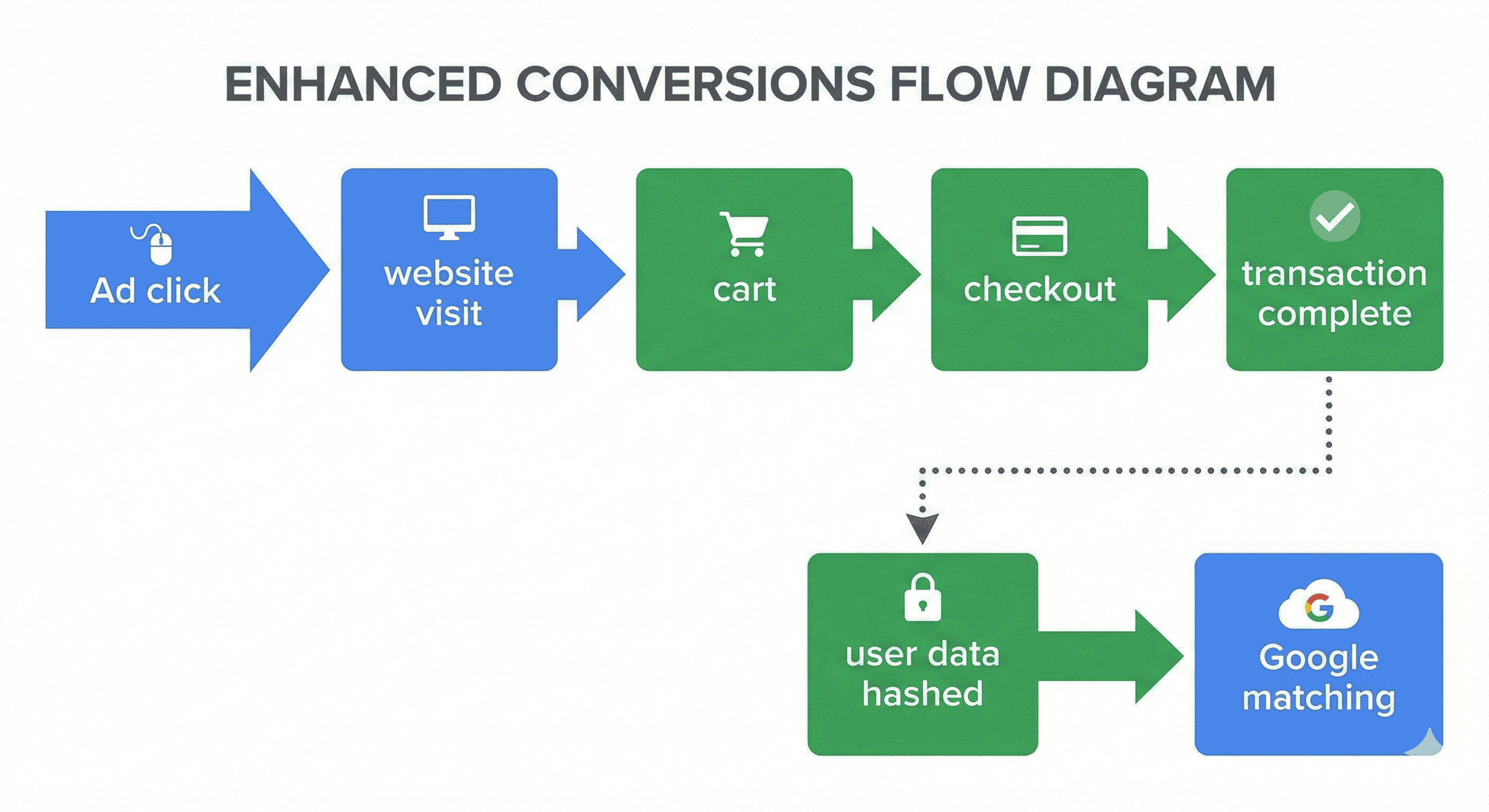
Enhanced Conversions for Web is built for e-commerce. The conversion happens online, right when someone completes a purchase. Data gets captured from checkout form fields (billing email, shipping address) and matched immediately.
The flow is straightforward: Ad click → website visit → cart → checkout → transaction complete → user data hashed → Google matching. Single event. Instant attribution.
Enhanced Conversions for Leads: Lead-to-Sale Attribution
Enhanced Conversions for Leads works differently. It's designed for businesses where the conversion happens offline and helps track sales that occur days or months after the initial lead capture.
The flow involves two events: Ad click → lead form submission → user data hashed → lead enters CRM → sales process → closed deal → offline conversion imported → Google attribution.
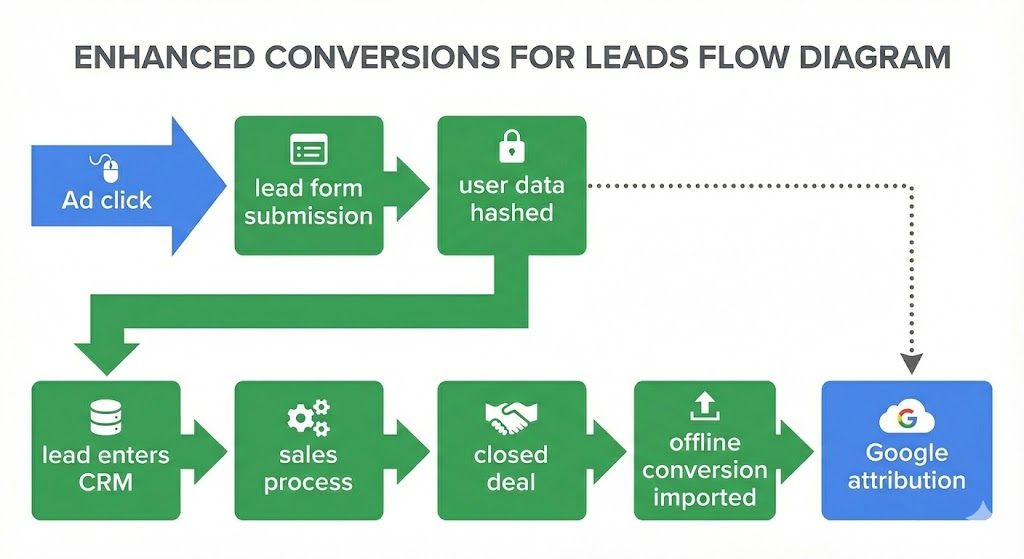
This is the version you need to measure conversions if you're running B2B lead gen, professional services, or any high-consideration purchase where sales happen through calls, meetings, or demos.
Enhanced Conversions vs Ehanced Conversions for Leads
Timing Aspect | Enhanced Conversions (Web) | Enhanced Conversions for Leads |
|---|---|---|
Conversion Moment | Immediate | Delayed (days to months) |
Data Capture | Single event | Two events (form + CRM) |
Typical Lag | 0-24 hours | 7-90+ days |
Choose Enhanced Conversions for Web when transactions are completed online, the conversion value is known at purchase, and you have no offline sales process.
Use enhanced conversions for leads when conversions occur offline through phone sales or meetings, conversion value varies by deal size, sales cycles exceed 7 days, and your CRM tracks the full lead-to-customer journey.
Some businesses need both. A SaaS company with self-serve purchases and an enterprise sales team would implement the Web variant for credit card signups and the Leads variant for demo requests that close through sales reps.
How to Set Up Enhanced Conversions for Leads?
When you set up enhanced conversions, Google gives you two tracking method options. Each has tradeoffs.
Automatic Setup Method
Automatic setup lets Google scan any form on your site and detect form fields using pattern matching. It looks for common input attributes like name="email" or type="tel" and captures data without you configuring anything specific.
The upside? Fast implementation. Maybe 15 minutes. No CSS selectors to write. Works across multiple forms without individual mapping.
The downside? Limited control. Google might miss custom-named fields. If your form uses lead_email instead of email, automatic detection could fail silently. Troubleshooting becomes difficult when you can't see exactly what's being captured.
Manual Setup Method
Manual setup puts you in control. You specify exact CSS selectors for each field or provide JavaScript variables.
This means targeting elements like input#email, .form-email, or [name="user_email"] directly. You can also use data layer variables if you're running Google Tag Manager.
Manual setup takes longer. Plan for 30 minutes to 2 hours, depending on your form complexity. But you get full visibility into what data gets captured, easier debugging, and support for custom form builders like HubSpot, Typeform, or Gravity Forms.
Attribute | Automatic Setup | Manual Setup |
|---|---|---|
Implementation Time | 5 minutes | 1-2 hours |
Technical Skill | Low | High |
Field Detection | Google heuristics | Explicit selectors |
Custom Fields | Limited support | Full support |
Debugging | Limited visibility | Full visibility |
Choose automatic for standard forms with conventional field names. Choose manual when you need precision or your form builder doesn't follow standard conventions.
Here's the step-by-step process for setting up ECL in your Google Ads account:=
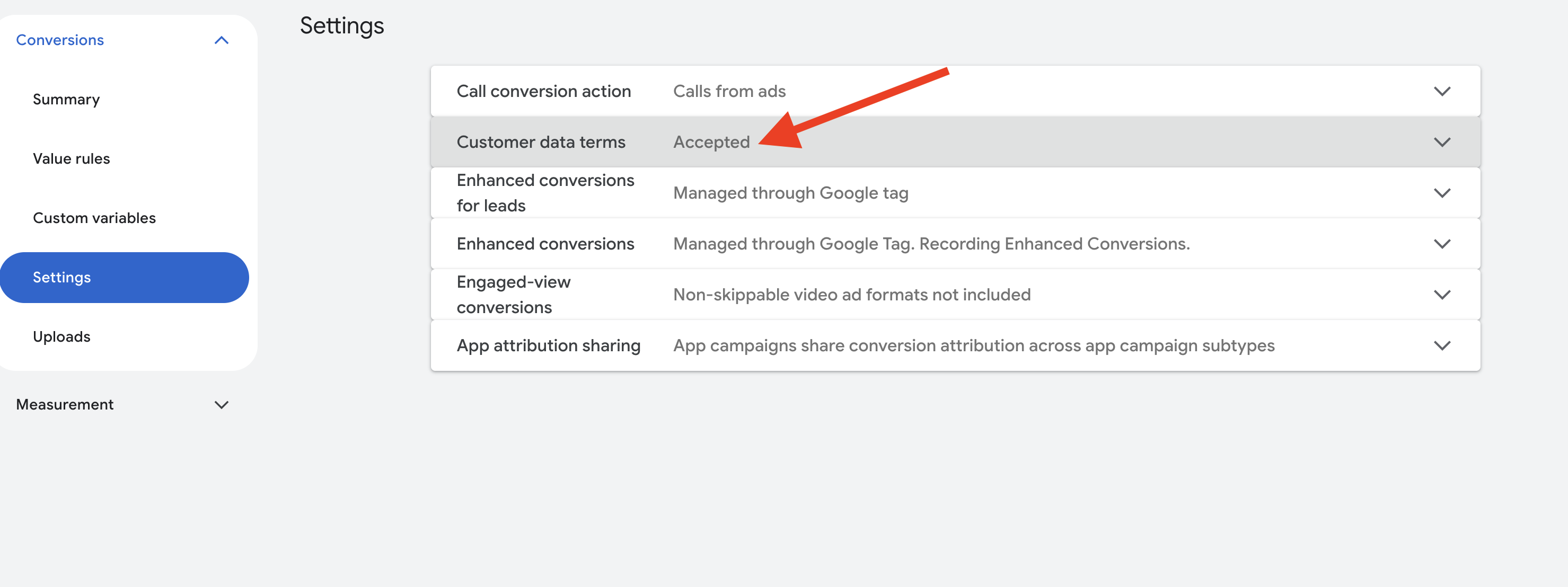
Step 1 - Navigate to Goals -> Conversions -> Settings and make sure you accept the Google Ads customer data terms.
Step 2 - Enable "Turn on enhanced conversions for leads" & choose your setup method
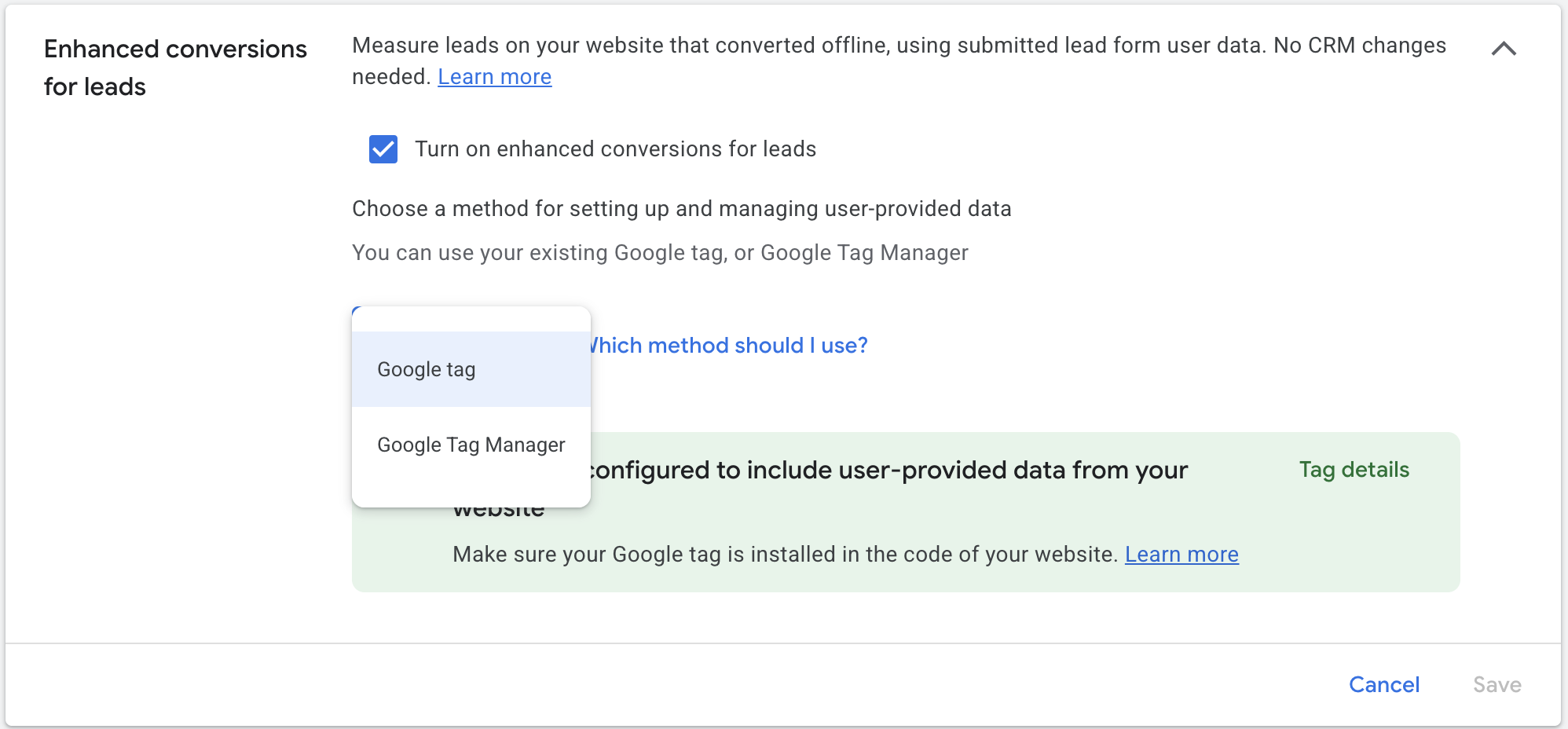
If you choose to use the Google tag, make sure your G-tag is set up for automatic
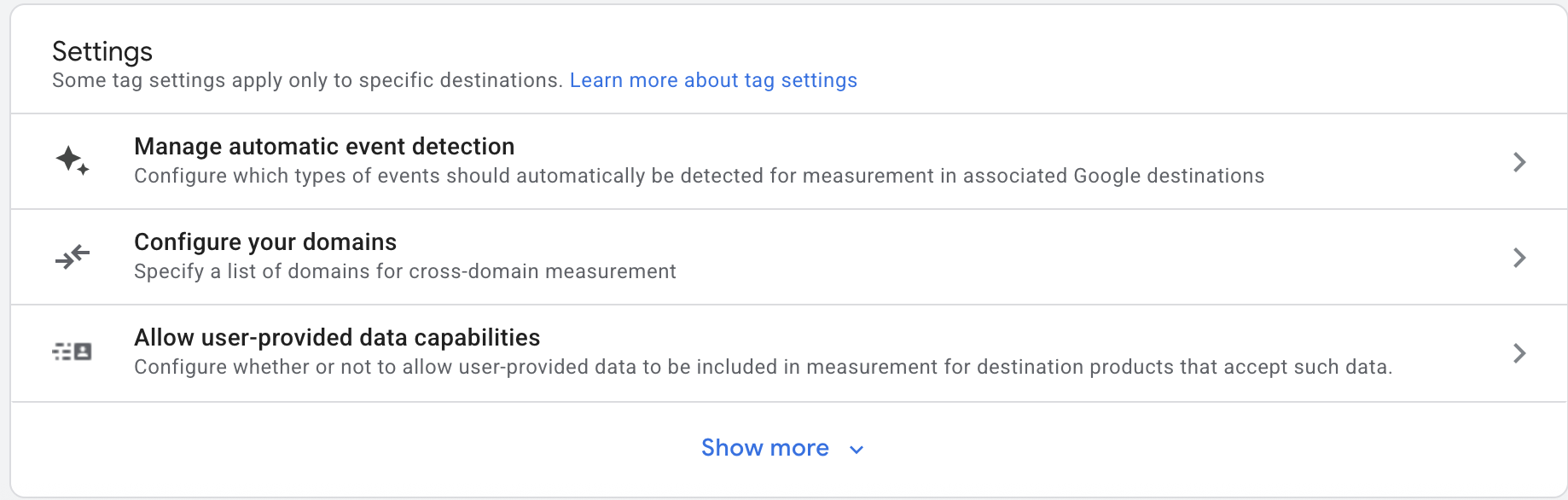
If you choose to set up enhanced conversions for leads through Google Tag Manager, it's a bit more technical, but follow these steps:
- Configure a User-Provided Data variable in GTM
- Map form fields to enhanced conversion data layer variables
- Set CSS selectors or JavaScript variables for field identification
- Publish your container and verify in Google Ads conversion diagnostics
If you get stuck, Measure School has a great video on using Google Tag Manager to set up enhanced conversions for leads.
Step 3 - Once you have the technical infrastructure set up, you can start uploading offline conversions back to Google Ads via:
- Google Ads API
- Data Manager API
- Manual uploads
- Automated offline conversion import tool, like Adscriptly
We have an in-depth guide for setting up offline conversion tracking you can check out as well.
For CSS selectors, common patterns include input[type="email"] for email fields and input[type="tel"] for phone numbers. Test your selectors in browser developer tools before deploying. Run document.querySelector('your-selector') in the console to confirm you're targeting the right element.
Enhanced Conversions for Leads Match Rate Optimization
Your match rate determines how many conversions Google can attribute back to ad clicks. Higher match rates mean better data for Smart Bidding, which is one of the key benefits of enhanced conversions. In controlled tests, agencies have measured an average 16% increase in tracked conversions when enhanced conversions were enabled, with some accounts seeing lifts as high as 33% (Workshop Digital, 2025).
Data Quality Factors
Email addresses deliver the highest match rates, typically 40-60%. Phone numbers add another 15-25%. Full name combined with address contributes 10-20%. When you capture all fields correctly, combined match rates can reach 50-80%.
Data Field | Typical Match Rate |
|---|---|
Email (primary) | 40-60% |
Phone Number | 15-25% |
Full Name + Address | 10-20% |
All Fields Combined | 50-80% |
To improve the accuracy of your match rates, data quality matters more than quantity. Typos in email addresses, missing country codes on phone numbers, and incomplete name fields all hurt your match rate. Normalize your data before it hits Google. Lowercase everything, trim whitespace, and validate email formats at the form level.
Enhanced Conversions for Leads in Value-Based Bidding
This is where enhanced conversions gets really powerful for lead gen businesses. Understanding how value-based bidding works is essential to getting the most from this setup.
Offline Conversion Import Integration
Enhanced conversions for leads pairs with offline conversion imports to feed offline conversion data back to Google Ads. When a lead closes in your CRM, you upload that conversion with the deal value attached.
You can automate this through the Google Ads API, scheduled uploads via Zapier, a Google Sheet, or custom scripts that sync your CRM nightly. The conversion value comes directly from your CRM deal amounts, not some arbitrary placeholder number.
Smart Bidding Signal Enhancement
Here's what this means for your campaigns. Standard lead gen optimizes for form fills. Every lead looks the same to Google. But when you import offline conversions with real values, Smart Bidding learns which clicks actually turn into revenue. Google reports a 17% average conversion lift for advertisers who implement enhanced conversion tracking (OWOX, 2025).
Your tROAS and tCPA campaigns start optimizing for customers, not just leads. The algorithm sees that leads from certain keywords, audiences, or times of day close at higher rates and adjusts bids accordingly.
You'll need to configure conversion lag settings properly. If your sales cycle runs 30-60 days, set your conversion lag to match. This tells Google to wait before evaluating campaign performance. A Google Ads optimization tool can help automate this entire workflow and keep your bidding signals fresh.
Enhanced Conversions for Leads Privacy and Compliance
Enhanced conversions use SHA-256 hashing to create hashed customer data with one-way encryption. If you are planning on uploading your data manually, you can use a free SHA-256 hashing tool. Google can't reverse the hash to see the original email or phone number. They can only match it against the hashed data they already have.
For GDPR compliance, you need consent before transmitting data. Your cookie banner and privacy policy should cover this. Users must opt in before their information gets hashed and sent to Google.
CCPA and other US state privacy laws have similar requirements. Ensure your opt-out mechanisms work properly and your data processing agreements are in place.
Google's commitments help here. They only use matched data for attribution purposes. No sharing across advertisers. Data retention is limited to what's needed for conversion matching.
Troubleshooting Enhanced Conversions for Leads
If you're seeing zero match rate, work through this checklist:
- Verify your conversion tag fires on form submission
- Confirm that the user_data object populates in the data layer
- Check the consent mode state at conversion time
- Validate CSS selectors in browser developer tools
- Review enhanced conversion diagnostics in Google Ads
For declining match rates, audit recent form field changes, check for bot traffic spikes affecting form submissions, and verify no one modified your GTM container without updating the enhanced conversion configuration.
Key Takeaways
Enhanced conversions for leads connects your offline revenue to online ad clicks through first-party data matching. It solves the attribution gap that standard conversion tracking can't bridge. When implemented correctly with proper CRM integration and offline conversion imports, it transforms Smart Bidding from optimizing for leads into optimizing for actual customers.
The setup takes effort. But for any marketer running lead gen campaigns, the payoff is ad campaigns that understand what actually drives your business.
