Offline Conversion Tracking Explained

Offline conversions tracking explained
Google Ads Offline Conversion Tracking is a data integration method that connects offline sales outcomes with online advertising clicks. This system transmits revenue signals from CRMs, phone systems, and other 3rd party business software back to Google Ads.
This enables Smart Bidding algorithms to optimize campaigns for actual business results rather than top-of-the-funnel metrics such as clicks and form submissions.
What are offline conversions?
The average B2B lead-to-customer conversion rate sits between 2% and 5%, with some industries seeing rates as low as 1.1% (Amra & Elma, 2025). That means on average, for every 100 form submissions, only 2-5 become actual customers. Without offline conversion tracking, Google keeps optimizing for all 100 leads equally.
Most businesses don't close deals instantly. A prospect clicks your ad, fills out a form, and enters your sales pipeline. Days or weeks later, they become a customer. The problem? Google Ads has no visibility into what happened after that initial click.
Offline conversion tracking solves this by sending conversion data back to Google after a lead has been qualified or sales have closed.
The mechanism works through identifiers such as the Google Click Identifier (GCLID), Enhanced Conversions For Leads, and phone call details in the Google Ads call details report.
Google captures data points when someone clicks your ad. When that person later converts offline, you match the identifier and upload the conversion. Google then attributes that sale to the original click.
How do Google Ads Offline Conversions Imports Work?
The import process follows a straightforward data flow:
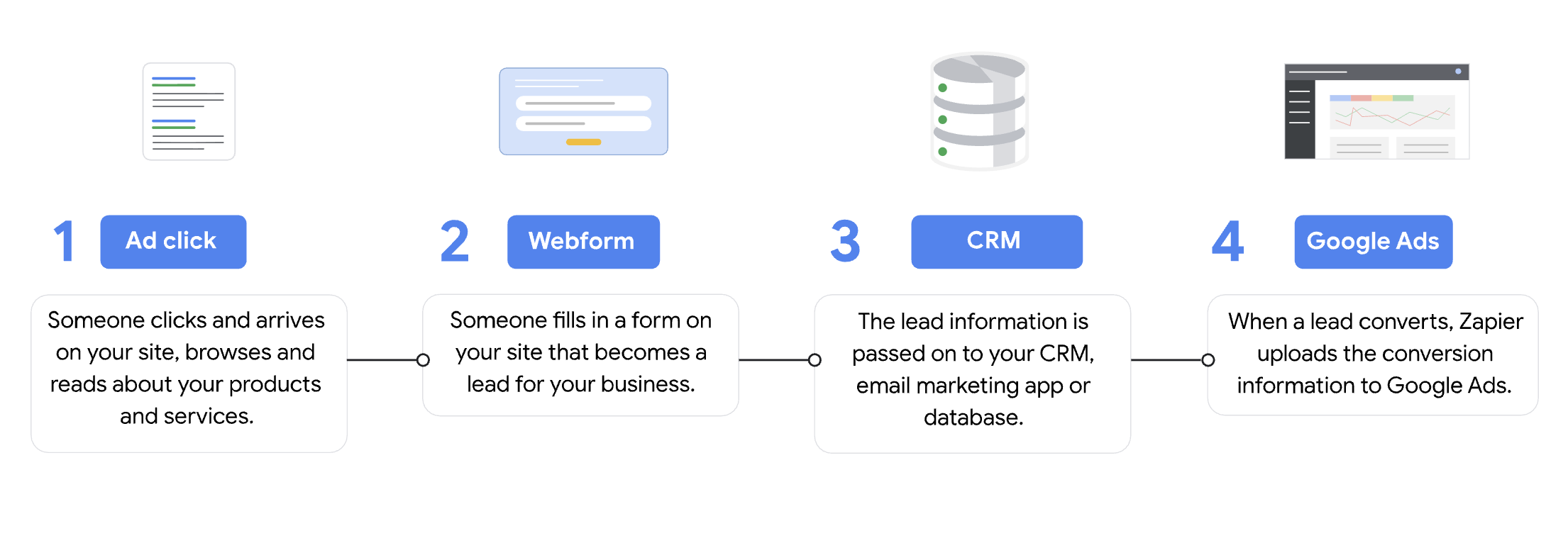
First, a potential customer clicks your ad and lands on your website, or calls a Google forwarding number; Google then captures the clicks or call identifiers at this moment.
Second, your website or call analytics platform stores this identifier alongside the lead's information. You can use and modify the JavaScript I made below to extract the GCLID from your website's URL
<script>
(function() {
  // 1. Read the 'gclid' parameter using URLSearchParams
  var params = new URLSearchParams(window.location.search);
  var gclidValue = params.get('gclid');
  if (!gclidValue) return;  // Exit if there's no gclid

  // 2. Wait until the DOM is parsed and ready
  if (document.readyState === 'loading') {
    document.addEventListener('DOMContentLoaded', setGclidField);
  } else {
    setGclidField();
  }

  // 3. Function to locate your custom field and set its value
  function setGclidField() {
    var field = document.querySelector('input[data-custom-type="GCLID"]');
    if (field) {
      field.value = gclidValue;
    }
  }
})();
</script>
Third, when that lead becomes qualified or converts to a customer, you export the conversion data with the matched identifier. and upload this data to Google Ads, either manually or through automated integrations.
Google then connects the dots. Their algorithm attributes the offline conversion back to the specific campaign, ad group, keyword, and ad that generated the original click.
When you track offline conversions, you're essentially telling Google which clicks and calls produced real business value, expanding beyond the vanity metrics that are just in your Google Ads dashboard.
Types of Google Ads Offline Conversions
Import From Calls
Call conversion imports track phone calls from ads that result in sales. Your call tracking system captures the Google Click ID, logs outcomes in your CRM, and then uploads successful conversions back to Google. Conversion window: 60 days. Best for service businesses like law firms, home services, and healthcare, where phone calls drive revenue.
Import From Clicks
Click-based imports track conversions from ad clicks to website visits. When someone submits a form, your system captures the GCLID and stores it in your CRM. When that lead closes, you upload the conversion. Conversion window: 90 days. Handles B2B deals with long sales cycles and any transaction that closes outside your website.
GCLID vs. Enhanced Conversions for Leads
GCLID | Enhanced Conversions for Leads | |
|---|---|---|
How it works | Captures a unique click identifier in URL | Uses hashed first-party data (email/phone) |
Conversion window | 90 days | 63 days |
Pros | Higher match rates, precise click-level attribution, and granular keyword reporting | Much Simpler setup, works when click data is lost, handles cross-device journeys |
Cons | Requires CRM integration, IDs lost if cookies cleared or devices switched | Lower match rates if users weren't signed into Google when clicking & requires consistent first-party data collection |
Google recommends pairing both methods for maximum conversion coverage.
The Benefits of Offline Conversion Tracking & Why You Should Use Them.
Using offline conversions fundamentally changes how your ad spend performs. The median ROAS for offline services using Google Ads is 2.46x according to 2025 benchmark data. But businesses connecting offline conversion data to Smart Bidding often exceed this significantly.
Here's what actually improves:
Smarter Bidding Decisions. Google's algorithms stop optimizing for cheap clicks that never convert. Instead, they learn which audience signals correlate with closed deals and adjust bids accordingly.
Accurate ROAS Measurement. You see true return on ad spend based on revenue, not proxy metrics. That $50 lead that closes a $10,000 deal gets properly valued.
Reduced Wasted Spend. Research shows businesses waste 25-40% of their Google Ads budget on poor targeting and unqualified leads (RunPPC, 2025). Campaigns stop attracting tire-kickers and start attracting buyers when you feed conversion quality signals back to Smart Bidding.
Better Budget Allocation. You identify which ad campaigns, keywords, and audiences drive real revenue. Budget flows toward what works.
Value-Based Bidding: The Next Level
Value-based bidding takes offline conversion tracking further by assigning different conversion values to different outcomes. Instead of telling Google that a conversion happened, you tell Google how much that conversion was worth.
Not all leads are equal. A $500 deal and a $50,000 deal both count as one conversion, but they shouldn't influence your bidding the same way. Value-based bidding solves this.
When you pass revenue data back to Google, Smart Bidding strategies like Maximize Conversion Value and Target ROAS can optimize for total revenue rather than conversion count. Google learns which click patterns produce high-value customers versus low-value ones.
How to Set Up Google Ads Offline Conversion Tracking
You can set this up manually or use a Google Ads automation tool like Adscriptly to programmatically create conversion actions and sync your CRM data automatically.
Here are the 2 basic steps to get started:
Step 1: Create an Offline Conversion Import Conversion Action
- Start in your Google Ads account.
- Navigate to Goals, then Conversions, then Summary.
- Click the plus button to create a qualified lead or converted lead conversion action.
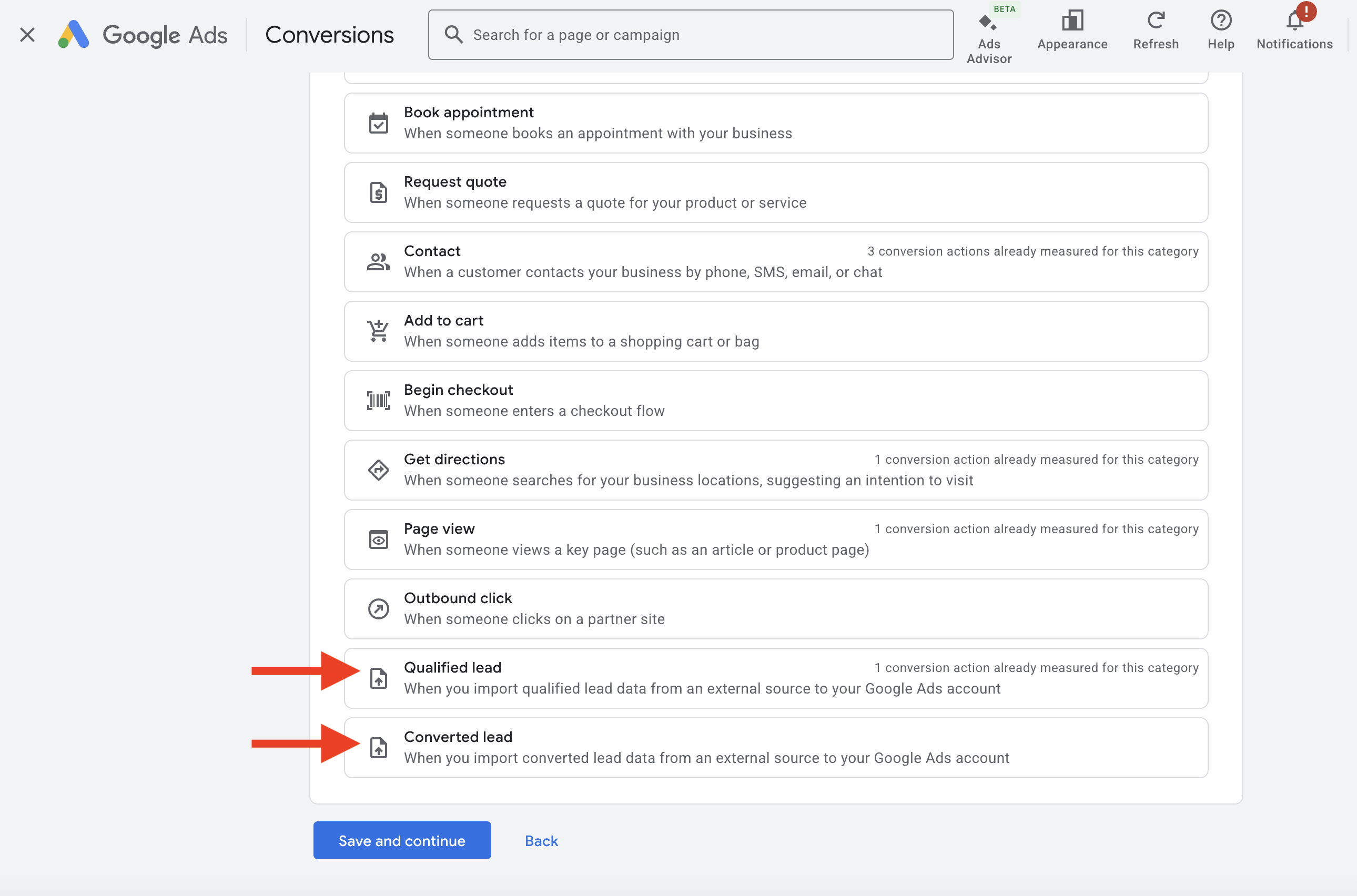
- Name your conversion action something clear, like "Closed Won Deals" or "Qualified Sales."
- Set the value as "Use different values for each conversion" if you're implementing value-based bidding.
Step 2: Complete the Google Ads Prerequisites
Before importing offline conversions, configure these settings in your Google Ads account:
- Turn On Auto-Tagging. Navigate to Admin > Account Settings and enable auto-tagging. This appends the GCLID parameter to your URLs automatically. Without it, click tracking breaks completely.
- Accept Customer Data Terms. Go to Goals > Settings and expand Customer Data Terms. Review and accept the terms—this is required before uploading any conversion data.
- Configure Your Tag for Enhanced Conversions. Ensure your Google Tag or Google Tag Manager is set up to capture hashed user data (email or phone) from your lead forms. This enables Enhanced Conversions for Leads matching alongside GCLID tracking.
Step 3: Choose Your Offline Conversion Import Method
Manual Google Sheet Upload
Best for testing. Export CRM data, format it using Google's template (GCLID, Conversion Name, Conversion Time, Conversion Value), and upload under Goals > Conversions > Uploads.
Scheduled Google Sheet Upload
Connect a Google Sheet URL to Google Ads for automated daily or weekly imports. Keeps Smart Bidding fed without manual work—just maintain correct formatting.
Google Ads API
The most flexible and scalable option. Connect your CRM directly to Google Ads via the API for real-time or near-real-time conversion syncing. Requires developer resources or a third-party integration tool.
Direct CRM Integration
Google Ads now offers native integrations with CRMs like Salesforce and HubSpot. Connect your CRM directly through Google Ads Data Manager for automatic conversion syncing—no spreadsheets or manual uploads required.
Step 4: The Technical Setup (the hard part)
This is where most implementations break. The GCLID must flow seamlessly from ad click → landing page → form submission → CRM → back to Google Ads. Any break in this chain means lost attribution.
The Core Technical Challenge
When someone clicks your ad, Google appends ?gclid=xxx to your URL. You need to:
- Capture that parameter before it disappears
- Store it in a cookie (GCLID expires from URL on page navigation)
- Inject it into a hidden form field on submission
- Pass it to your CRM with the lead record
- Retrieve it when uploading conversions
Common Failure Points
- Redirects stripping the GCLID parameter
- Cookie expiration before form submission (default: 90 days)
- Hidden field ID mismatch between script and form
- CRM field character limits are truncating the GCLID
- Timezone mismatches are causing "conversion before click" errors
- Safari/iOS blocking third-party cookies
Zapier Workflow Structure
- Trigger: CRM status changes to "Closed Won"
- Filter: Continue only if GCLID exists
- Code Step: Parse GCLID using script above (if needed)
- Delay: 24 hours (Google needs time to process the click)
- Action: Google Ads → Send Offline Conversion
Parsing GCLID from Form Payloads (Zapier Code Step)
Form builders like Unbounce send data in unpredictable formats—sometimes as strings, sometimes as nested arrays like ["TEST123"]. This Python script handles all edge cases:
import json


# Pull in the data from the Input Data section
payload_str = input_data.get("unbounce_form_data", "")


try:
    # Try to parse as JSON
    payload = json.loads(payload_str)
except:
    # If parsing fails, fallback to the raw string
    payload = payload_str


def extract_gclid(data):
    # If data is just a string, assume it's the gclid
    if isinstance(data, str):
        return data

    # If data is a dictionary, look for a key named "gclid"
    if isinstance(data, dict):
        # Direct key lookup
        if "gclid" in data:
            val = data["gclid"]
            # Unbounce often sends form fields as a list, e.g. ["TEST123"]
            if isinstance(val, list):
                return val[0] if val else None
            return val

        # Case-insensitive fallback
        for key, val in data.items():
            if key.lower() == "gclid":
                if isinstance(val, list):
                    return val[0] if val else None
                return val
        return None

    # If data is a list, see if there's a dict or string inside
    if isinstance(data, list):
        for item in data:
            found = extract_gclid(item)
            if found:
                return found

    # If all else fails, return None
    return None


gclid_val = extract_gclid(payload)


output = {
    "gclid_extracted": gclid_val
}
Google Ads Offline Conversion Import Templates:
Google provides CSV templates with required fields: Google Click ID, Conversion Name, Conversion Time (with timezone), and Conversion Value (numeric, no currency symbols).
Download Templates:
- GCLID Click Conversion Import Template
- Call Conversion Import Template
- Enhanced Conversions for Leads via Data Manager
Upload Frequency: Weekly works for most accounts. Daily uploads benefit high-volume advertisers—faster data means faster algorithm optimization.
Making Offline Conversion Tracking Work
The technical setup is just the beginning. Successful implementation requires clean CRM data, consistent sales process adherence, and regular monitoring of match rates.
Track your upload success rates in Google Ads and cross-reference with Google Analytics to verify conversion paths. Low match rates indicate problems with GCLID capture or data formatting.
High match rates with poor campaign performance suggest you need more conversion volume before Smart Bidding can optimize effectively.
Offline conversion tracking closes the loop between ad spend and revenue. When implemented correctly, it transforms Google Ads from a lead generation tool into a profit engine.
