Google Ads Bidding Strategies: Manual vs Smart Bidding Guide

Mastering Google Ads Bidding Strategies
Google Ads bidding is the auction mechanism that determines where your ads show, what you pay per click, and how often your ads appear. Every time someone searches, Google runs a Google Ads auction. Your bid is just one factor.
Most advertisers treat bidding as a simple "set it and forget it" decision. That's a mistake. Your bidding strategy should evolve throughout the lifecycle of your Google Ads campaigns based on the data available. Google Ads optimization software can help automate this progression as your conversion data grows. Pick the wrong strategy for your situation and you'll either overpay for clicks or starve your campaigns of traffic.
What Are the Different Types of Bidding Strategies in 2026
Google offers seven primary bidding strategies for Google Ads. Each serves a different goal. Not all automated bid strategies work for every account. Some need conversion data to function. Others burn the budget without it. Choosing the best bidding strategy depends on your data, not your goals.
Manual CPC
Manual CPC bidding allows you to set a bid for each keyword. No algorithm involved. You control everything and decide the right bid for each keyword.
This works best for new Google Ads account setups or search campaign configurations generating fewer than 30 conversions per month. Without enough conversion data, Google AI is basically guessing. Manual control gives you predictable spend while you build that data foundation.
The downside? It's time-intensive. You're adjusting bids based on campaign performance, competition, and dozens of other factors. For large accounts, this becomes unmanageable fast. Some advertisers use Google Ads scripts to automate bid adjustments while staying on manual.
Maximize Clicks
Google spends your full daily budget to get as many clicks as possible within your budget. Simple as that.
There's no conversion optimization here. Google doesn't care if those clicks convert. It just wants volume. You can set a maximum CPC bid limit to prevent runaway costs on expensive keywords. This CPC bid cap keeps aggressive bidding in check.
Use this for awareness campaigns or when you're testing new keywords and need traffic data quickly. Don't use it when conversions matter.
Target Impression Share
Target impression share bidding bids to achieve a specific visibility goal. You choose where you want to appear: absolute top of page, top of page, or anywhere on the results page. The highest bid doesn't always win—Ad Rank factors in Quality Score too.
Brand defense is the classic use case. If competitors bid on your brand name, this strategy ensures you show up first. It's also useful for awareness campaigns where visibility matters more than efficiency.
Maximize Conversions
Google spends your full budget to drive as many conversions as possible. Google AI handles bid adjustments automatically, optimizing for each Google Ads auction based on those 3,800+ signals.
Here's the catch: this strategy requires 30 to 50 conversions per month to work reliably. Below that threshold, the algorithm lacks enough data to make smart decisions. You'll see erratic campaign performance and wasted spend.
There's also a learning period. Expect 7 to 30 days of fluctuating results while Google figures out what works. Don't panic and change things during this window. Let it learn.
You can set a target CPA constraint to keep costs in check. Without it, Google will spend aggressively to hit conversion volume, regardless of efficiency.
Target CPA (Cost Per Acquisition)
Target CPA bidding allows you to set your target cost per conversion. The algorithm then optimizes bids to hit that number across your Google Ads campaigns.
This requires the same 30 to 50 monthly conversions minimum. And here's a tip most advertisers ignore: set your bid targets based on actual historical performance, not your dream goal. If your current CPA is $50, don't set a $25 target and expect magic. Start at $45 to $50, then gradually tighten.
One thing to watch: Google may throttle your spend if it can't hit your target. You'll see lower impression share and fewer clicks. That's the algorithm protecting you from overspending, but it can limit growth if your target is too aggressive.
Maximize Conversion Value
Instead of chasing conversion volume, maximize conversion value bidding optimizes for total revenue. Google AI prioritizes high-value conversions or conversion value over low-value ones.
This requires conversion value tracking. You need to pass actual revenue data back to Google, not just "a conversion happened." This starts with understanding what is GCLID and how it connects clicks to conversions. For e-commerce, that means order values. For lead gen, it might mean assigning values based on lead quality tiers.
Recommended for businesses with variable transaction values. If you sell products ranging from $20 to $2,000, this strategy ensures Google chases the $2,000 sales instead of flooding you with $20 orders.
Target ROAS (Return on Ad Spend)
Target ROAS bidding allows you to set a target return. If you want $4 back for every $1 spent, you set a 400% Target ROAS. Google then optimizes bids to hit that ratio.
This has a higher data threshold. You need 50+ conversions with values per 30 days. For businesses with longer sales cycles, offline conversion tracking helps feed this data back to Google. The algorithm needs enough transaction data to understand what drives high-value outcomes.
When introducing target ROAS bidding, set your initial target 10 to 20% below your current performance. If you're running at 350% ROAS, start with a 300% target. This gives the algorithm room to learn without suffocating spend. You can tighten it once campaign performance stabilizes.
Manual Bidding vs Automated (Smart) Bidding
This is where most advertisers get stuck. Manual CPC bidding or automated bidding in Google Ads? The answer depends entirely on your data.
What Is Manual Bidding?
Manual bidding means you control every bid. You decide what to pay for each keyword, adjust bids based on performance, and optimize through your own analysis. It allows you to set the right bid at the keyword level.
How to Set Starting CPC Bids
Google Keyword Planner gives you estimated bid ranges for your target keywords. Start there. Look at the "top of page bid" estimates as your baseline.
The Quick Formula Method
A practical approach: average the low and high estimates, then add 25% on top. New campaigns typically pay a premium until Quality Score stabilizes and the algorithm learns your performance patterns.
Keyword Planner Range | Calculation | Starting Bid |
|---|---|---|
$2 – $7 | (($2 + $7) / 2) × 1.25 | $5.63 |
$1 – $4 | (($1 + $4) / 2) × 1.25 | $3.13 |
$5 – $12 | (($5 + $12) / 2) × 1.25 | $10.63 |
The Target CPA Method
You can also reverse-engineer from your target CPA: multiply your target CPA by your expected conversion rate to find your max CPC bid ceiling.
Target CPA | Expected Conversion Rate | Max CPC Ceiling |
|---|---|---|
$50 | 5% | $2.50 |
$100 | 3% | $3.00 |
$150 | 2% | $3.00 |
$200 | 4% | $8.00 |
The Conservative Start Method
Start with the lower end of the Keyword Planner range. Let the first 100 impressions come in, then check your actual average CPC. Google will show you if your bids are too low through limited impression share. Adjust in small increments from there.
Phase | Action | What to Watch |
|---|---|---|
First 24-48 hours | Set bid at lower range estimate | Impression share, avg. position |
After 100 impressions | Compare actual CPC to bid | If actual CPC equals max bid, you're likely losing auctions |
Week 1 | Raise bids 10-15% on high-performing keywords | CTR, conversion rate |
Ongoing | Adjust based on CPA performance | Cost per lead, ROAS |
The Aggressive Start Method
Start at the high end of the Keyword Planner range or slightly above. This approach prioritizes data collection and top positions over cost efficiency. You'll pay more upfront but gather conversion data faster to inform optimization decisions.
Phase | Action | What to Watch |
|---|---|---|
First 24-48 hours | Set bid at or above high range estimate | Top impression share, absolute top % |
After 50-100 clicks | Identify which keywords convert | Conversion rate, cost per conversion |
Week 1 | Lower bids on non-converting keywords | Wasted spend, search term relevance |
Week 2+ | Scale winners, cut losers | CPA trends, ROAS by keyword |
This method works best when you have budget flexibility and need to prove ROI quickly. The tradeoff: you'll spend more during the learning phase, but you'll reach optimization decisions faster than the conservative approach.
As a general rule of thumb, don't set your starting bid too low. Bottom-of-page placements attract low-quality traffic that rarely converts.
When Manual Bidding Outperforms Smart Bidding
Manual wins in two scenarios. First, when your conversion volume sits below 30 per month. Automated bidding in Google Ads needs data to optimize. Without it, you're paying Google to guess.
Second, new campaigns without historical data. The algorithm has nothing to learn from. You're better off controlling spend manually until you build a conversion baseline. Consider testing automated bidding once you hit 30+ monthly conversions.
What Is Smart Bidding?
Smart Bidding is Google's machine learning system for automated bid optimization. Google AI adjusts bids in real time for every single Google Ads auction, analyzing signals you could never process manually.
The system considers device, location, time, browser, operating system, audience lists, and hundreds of other factors. It learns what combinations drive conversions or conversion value and adjusts accordingly.
Smart Bidding strategies include Maximize Conversions, Target CPA, Maximize Conversion Value, and Target ROAS. All require sufficient conversion data to function properly. For lead gen accounts, enhanced conversions for leads improves data accuracy.
How to Choose a Bidding Strategy
This is a question I get asked a lot when marketers are setting up a new search campaign in their Google Ads account. The answer depends on how competitive your industry is, but mastering Google Ads bidding comes down to following an evolving progression of bid strategies to maximize performance in your campaigns:
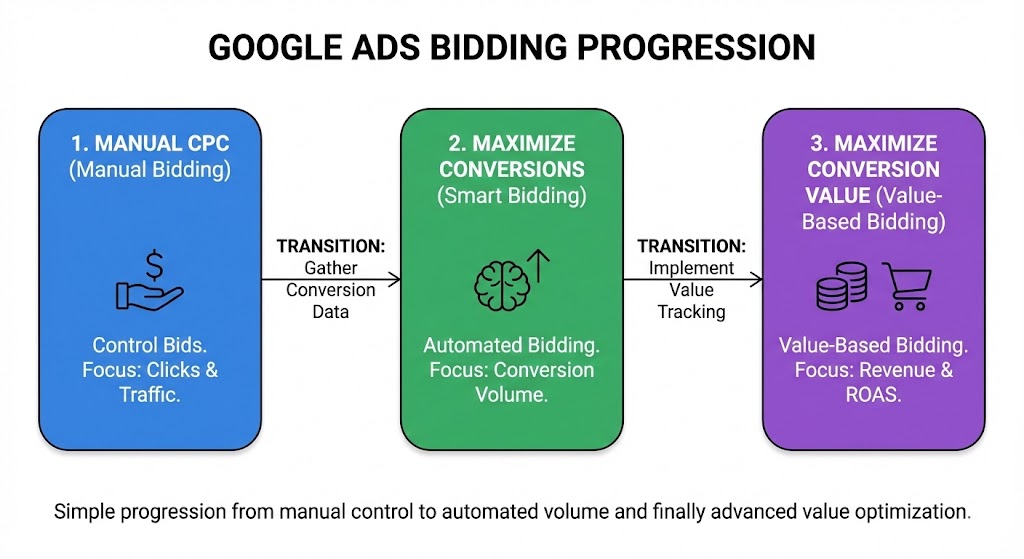
Under 30 monthly conversions: Start with Manual CPC bidding or Maximize Clicks. Build your data foundation first. Set a bid conservatively while gathering data.
*It's important to note that sometimes if your industries cost per clicks arn't to high you can start off with maximize conversions and it will work fine.
Between 30 and 50 conversions: Start testing automated bidding with Maximize Conversions. You have enough data for Google AI to start learning.
Above 50 conversions with value tracking: Move to target ROAS bidding or maximize conversion value bidding. You can now optimize for revenue, not just volume.
The progression matters. Jumping straight to Target ROAS with a new Google Ads account almost always fails. You're asking the algorithm to optimize without giving it anything to learn from.
What Determines Ad Rank?
Every time someone searches, Google runs a Google Ads auction. Your set bid is just one factor. Google calculates Ad Rank to decide which ads win and where they appear. The highest bid doesn't guarantee the top position.
Quality Score measures how relevant your ad is to the search. It includes expected click-through rate, ad relevance to the query, and landing page experience. A higher Quality Score means you can win auctions while paying less per click.
Your max CPC bid sets the ceiling on what you're willing to pay. But here's what most people miss: you rarely pay your max bid. Google uses a second-price auction, so you only pay enough to beat the next competitor.
Expected impact from ad extensions also factors in. Sitelinks, callouts, and structured snippets can boost your Ad Rank without increasing your bid.
How to Leverage Google Ads Bid Adjustments
Bid adjustments let you increase or decrease bids based on specific conditions. Device type, location, time of day, and audience segments all support adjustments.
Here's what most advertisers don't realize: Smart Bidding ignores most bid adjustments. If you're running Target CPA bidding or target ROAS bidding, your manual device and location adjustments get overridden. Google AI already optimizes for these signals in real time. Setting a +20% mobile bid adjustment does nothing.
The one exception? Audience bid adjustments in observation mode still influence some strategies. But even these have limited impact.
The Workaround: Conversion Value Rules
Google introduced Conversion Value Rules as the solution. Instead of adjusting bids, you adjust the value of conversions or conversion value based on conditions.
For example, you can tell Google that conversions from California are worth 50% more than conversions from other states. Or that mobile conversions are worth 30% less. Google AI then factors these value differences into its bidding decisions.
This works because you're speaking the algorithm's language. Smart Bidding optimizes for value. When you adjust values instead of bids, the system actually listens.
You can set value rules by audience segment, location, and device. This gives you back the control that traditional bid adjustments lost when you switched to automated bidding in Google Ads.
For detailed implementation, check out our guide on value-based bidding.
